
1-click Automation Tool for STAAD.Pro - dEZignLink Overview
dEZignLink by Root Bridge Technologies is a 1-click automation toolbar plugin for STAAD.Pro that enhances structural engineers' productivity by delivering significant time, cost, and manhour savings—paying for itself within 2-3 projects and saving up to $13,000 annually per license across industries like energy, government, mining, and water utilities.
Close
What is it you are searching for ?
Search our site for products, services, training and support

Connect with providers of complementary solutions to drive successful infrastructure projects
Explore and engage with our global, innovative ecosystem to streamline workflows, and achieve greater efficiency.
Slide 1 of 1
Search 1-click Automation Tool for STAAD.Pro - dEZignLink
1-click Automation Tool for STAAD.Pro - dEZignLink
Root Bridge Technologies Private Limited
Enquire Now
Solution Type:
Applications and Plug-ins
Platform Category:
- Open Applications and MicroStation
Lifecycle Phase:
- Design
Industry:
- Energy Production
- Government
- Mining
- Water Utilities
Web Page:
Company Description
We are revolutionizing the way engineers interact with their tools. We specialize in the Structural Engineering domain, developing tools / software plugins to complement leading Analysis and Design software - STAAD.Pro. We focus on enhancing the efficiency and productivity of engineering professionals worldwide.
Enhance your Structural Engineering workflow and experience unparalleled efficiency!
Solution Description
dEZignLink is designed to help Structural Engineers work more efficiently with STAAD.Pro. Featuring a collection of carefully curated tools, this toolbar delivers exceptional time and cost savings.
Benefits
Fast ROI
The software pays for itself within 2-3 structures per license.
Cost Savings
Save between USD 5,000 to 13,000 per STAAD.Pro licence every year.
Manhours Savings
Save up to 61% of engineering manhours on STAAD.Pro activities.
Features
Floating Toolsuite
No interference with the parent software GUI layout and views: \* Always on top. \* Click, drag, and position anywhere. \* Can be dragged to a separate screen.
Select Specific Element Types
No more tedious manual selection: \* Members categorized automatically with precision. \* Select members based on type or axis. \* Select beams or nodes at any level (by auto-defined Floor levels).
Define Releases in one go
Select multiple beams at once and let our smart RELEASE tool handle the rest: \* Assign START & END Releases simultaneously. \* Smart detection & application of START or END Releases. \* Auto skip releases for intermediate segments.
Assign Design Parameters swiftly
Assign the most critical parameters for any code in a breeze: \* Compatible with all relevant International Codes. \* Assign Effective Length for Columns or Beams. \* Define Deflection Joints (DJ1 & DJ2). \* Do all of the above for any structure in a matter of seconds.
And many more tools
\* Renumber Large Structures effortlessly \* Automatically create Groups \* Generate essential Output Tables, including pivot tables \* Generate Load Combination tables \* Create custom-defined Plate Girders \* Generate Structure Geometries in seconds - Piperacks and PEBs
Support & Maintenance
For complete help documentation on how to use our tool, click above.
For a complete video guide, refer the Video section below.
Bentley Brands Associated with Solution
- STAAD
Additional Material
dEZignLink Brochure - Enhancing Productivity Within STAAD.Pro
Learn more about how dEZignLink can solve your problems.
Images

Seamless integration with STAAD.Pro

Achieve productivity increase by up to 61%

Define Releases Tool

Release Operation

Design Parameters Tool

Design Parameters Operation

Define Groups Tool

Grouping Operation
Video
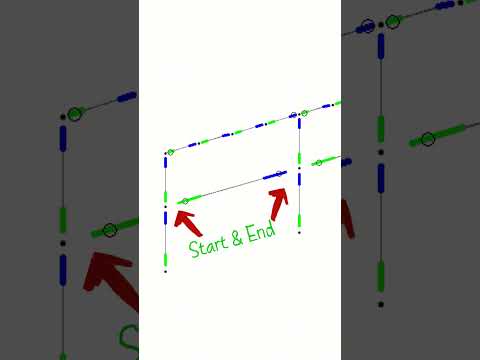
.dEZignLink - Amazing Tool (like AI) for STAAD.Pro users - Releases, Renumber, Design Parameters, and lots more
Key Features: • Select specific element types auto-defined by dEZignLink • Renumber large structures effortlessly • Automatically create Groups for easy model controlling • Define Releases quickly and easily • Assign Design Parameters in just seconds • Generate essential Output Tables, along with pivot tables • Generate Load Case & Combination tables seamlessly • Create user-defined Plate Girders • Generate Structure Geometries in seconds

Complete HELP for dEZignLink - Tool for STAAD.Pro
Learn how to use dEZignLink — a powerful automation tool for STAAD.Pro users. This video covers every feature step-by-step to help structural engineers save time and model smarter.
a6467108339449856.cdn.optimizely.com
a6467108339449856.cdn.optimizely.com is blocked
This page has been blocked by an extension
- Try disabling your extensions.
ERR_BLOCKED_BY_CLIENT
Reload
This page has been blocked by an extension