PLAXIS 3D: Geotechnical Engineering Software
PLAXIS 3D is a professional geotechnical finite element analysis software starting at $11,675 USD that enables engineers to solve complex 3D soil-structure interaction problems through integrated workflows, realistic phased construction simulations, and automation via Python scripting, supporting CAD and geological model imports to enhance safety assessment and project efficiency.
Close
What is it you are searching for ?
Search our site for products, services, training and support
PLAXIS 3D
Starting at
$11,675.00 USD
3D geotechnical finite element analysis software
BENEFITS
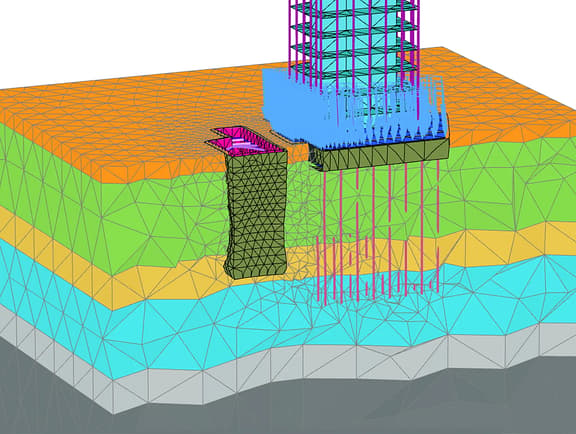
Solve complex 3D geotechnical challenges
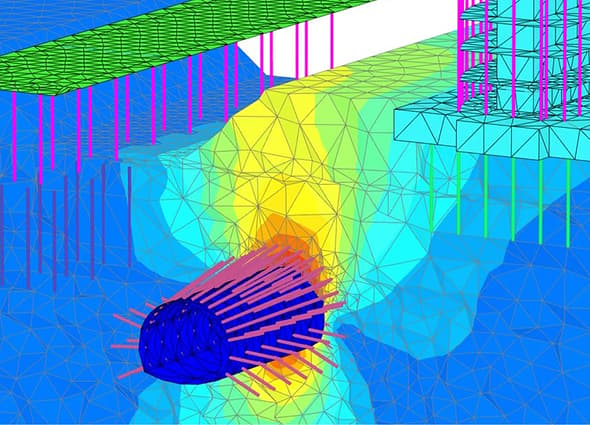
Analyze soil–structure interaction, stresses, strains, and deformations using advanced 3D finite element modeling.
-
Integrated 3D geotechnical workflows
Connect with other software by importing CAD and geological models to support site investigation through advanced 3D analysis.
-
Assess safety with realistic 3D simulation
Simulate phased construction and complex 3D ground behavior to predict deformations, assess stability, and reduce project risk.
-
Increase efficiency with automation
Use guided 3D workflows and Python scripting to automate complex model creation and repetitive design tasks.
PRICING OPTIONS
Exclusive pricing options
Find the right professional tier for you
PLAXIS 3D
Perform essential 3D deformation and safety analysis for soil and rock with these core capabilities.
Starting at
$11,675.00USD
12-month Virtuoso subscription
Includes 1 license and 2 Keys for training or services Keys are credits that can be redeemed for expert services and tailored training. Keys do not represent number of licenses.
- Create models quickly by importing CAD files and boreholes
- Use the tunnel designer and model structures like piles and anchors
- Get realistic assessments of stresses and displacements
- Analyze stability using the strength reduction method
Add to cart
PLAXIS 3D Advanced
Enhance your geotechnical design with advanced features, material models, and faster multicore processing.
Starting at
$15,625.00USD
Includes 1 license and 2 Keys for training or services
Includes 2 Keys per license for training or services Keys are credits that can be redeemed for expert services and tailored training. Keys do not represent number of licenses.
- Model creep and flow-deformation coupling with consolidation
- Use advanced models like Hardening Soil and Soft Soil Creep
- Solve problems faster with the parallel processing multicore solver
- Define your own material behavior with user-defined soil models
Add to cart
PLAXIS 3D Ultimate
Analyze the effects of vibrations, like earthquakes, and simulate complex hydrological conditions.
Starting at
$19,155.00USD
12-month Virtuoso subscription
Includes 1 license and 2 Keys for training or services Keys are credits that can be redeemed for expert services and tailored training. Keys do not represent number of licenses.
- Analyze soil vibrations from earthquakes and traffic loads with dynamics
- Model complex, time-dependent variations of water levels and flow
- Assess the effect of transient heat flow on hydraulic and mechanical behavior
- Tackle your most challenging and complex 3D geotechnical projects
Add to cart
Geotechnical Analysis 3D Advanced WorkSuite
This powerful suite includes PLAXIS 3D Advanced and GeoStudio 3D Advanced for teams needing a broad analysis toolkit.
Starting at
$19,540.00USD
12-month subscription license
Includes 2 Keys per license for training or services Keys are credits that can be redeemed for expert services and tailored training. Keys do not represent number of licenses.
- PLAXIS Advanced
- GeoStudio Advanced
Add to cart
Geotechnical Analysis 3D Ultimate WorkSuite
This comprehensive suite includes PLAXIS 3D Ultimate and GeoStudio 3D Advanced for a complete 3D solution.
Starting at
$22,000.00USD
12-month subscription license
Includes 2 Keys per license for training or services Keys are credits that can be redeemed for expert services and tailored training. Keys do not represent number of licenses.
- Get all the powerful capabilities of PLAXIS 3D Ultimate
- Perform 3D limit equilibrium slope stability analysis in GeoStudio
- Simulate complex 3D groundwater flow and contaminant transport
- Use pore water pressure results for advanced slope stability assessments
Add to cart
PLAXIS 3D Output Viewer
Free software application to review the output of calculated PLAXIS 3D projects without a commercial PLAXIS 3D license.
- Optimize your geotechnical digital workflow by accelerating approvals and reviews
- Collaborate with project stakeholders without purchasing additional software applications
- Enterprise and other licensing options
Ask us about scalable licensing options and dedicated support.
Get in touch
Access Bentley software, training, and resources free for academic use.
Get started with Bentley Education
More details
Technical capabilities
Modeling
- Import geometry from STEP, Parasolid, DWG or DXF CAD files.
- Import structural elements and foundations from IFC BIM data
- Define complex soil stratigraphy from imported borehole data.
- Design and analyze tunnels with the dedicated tunnel designer tool.
- Model structures like piles, anchors, geogrids, and shotcrete linings.
- Use automatic 3D mesh generation with refinement for accuracy.
Material models
- Access an extensive library of advanced soil and rock material models
- Use models like Mohr Coulomb, Hardening Soil, and Jointed Rock
- Define joints and interfaces to model faults or soil-structure interaction
- Model unsaturated soils or create your own with User-Defined Models
Calculations
- Simulate phased excavation and construction with staged construction
- Analyze stability with safety analysis using the strength reduction method
- Apply partial factors to loads and materials with Design Approaches
- Model time-dependent changes in water levels, loads, and functions
- Perform consolidation and coupled flow-deformation analysis
Results
- Visualize results in 3D with contour plots, vectors, and iso-surfaces
- Create cross-sections to view results in a 2D plane
- Generate detailed reports and export data in various formats
- Use the Curve plotter to visualize relationships between data points
- Create animations to visualize deformations over time
Automation and performance
- Leverage a multicore solver for faster calculation times
- Automate tasks and create custom scripts with the Python API
- Manage and queue multiple analyses with the Calculation Manager
- Benefit from an intuitive and user-friendly interface
Interoperability
- Connect to ProjectWise for collaborative project data management
- Couple with structural packages using super-elements for SSI analysis
- Convert existing PLAXIS 2D models directly into PLAXIS 3D
- Automate communication with other tools through the Python API
System requirements
Processor:
- Dual Core CPU required, Quad Core CPU recommended
Operating System:
- Windows 10, Windows 11
Memory:
- 8 GB recommended, large projects may require more
Disk space:
- Minimum 2 GB free space on the partition where the WindowsTEMP directory resides, and 2 GB free space on the partition where projects are saved. Large projects may require significantly more space on both partitions.
For best performance, ensure that the TEMP directory and the project directory reside on the same partition.
Display :
- Graphics Card: Required: GPU with 256 MB OpenGL 3.3 Bentley strongly recommends avoiding simple onboard graphics chips in favor of a discrete GPU from the nVidia GeForce or Quadro range with at least 128-bit bus and 1 GB of RAM, or equivalent solution from ATI/AMD.
- Video: 1024 x 768 pixels 32-bit color palette required, 1920 x 1080 pixels 32-bit color palette recommended
See more
RELATED PRODUCTS
You might also be interested in...
Enjoy PLAXIS 3D? Expand your toolbox and your capabilities with these related products.
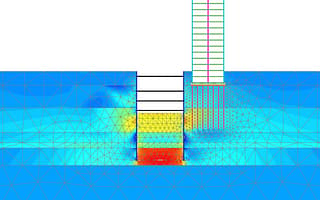
PLAXIS 2D
Starting at
$4,450.00USD
2D geotechnical finite element analysis software
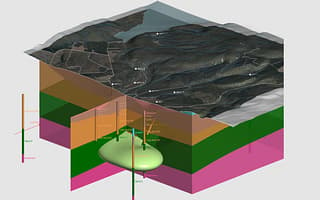
Leapfrog Works
Starting at
$11,600.00USD
3D geological and subsurface modeling software
USER STORIES
Real stories. Real results.
Technip Energies cuts analysis time by 90%\ (opens in new tab)
Technip Energies automated its PLAXIS 3D modeling with Python, reducing a week of complex engineering analysis to just half a day.
Mott MacDonald cuts concrete use by 40%\ (opens in new tab)
On the HS2 project, Mott MacDonald used PLAXIS 3D for stability analysis, leading to a 40% reduction in concrete and a 35% reduction in steel.

Set 1 of 1
FAQS
Find answers
What is PLAXIS 3D?
PLAXIS 3D is a 3D geotechnical finite element analysis software used to model stress–strain behavior, deformations, stability, and soil–structure interaction in soil and rock. It supports complex construction staging, groundwater conditions, and loading scenarios for infrastructure and mining projects.
What is 3D geotechnical finite element analysis software?
3D geotechnical finite element analysis software simulates how soil, rock, and structures respond to loads using stress–strain calculations. It enables realistic prediction of forces, displacements, and interactions between ground and structures in three dimensions.
What is PLAXIS 3D used for?
PLAXIS 3D is used to analyze foundations, excavations, embankments, tunnels, slopes, and underground works, capturing realistic soil and rock behavior under static, dynamic, and time-dependent conditions.
Does PLAXIS 3D support automation?
Yes, PLAXIS 3D supports automation through command-line options and a Python scripting interface, enabling users to automate model creation, calculations, and results extraction within digital workflows.
What differentiates PLAXIS 3D from other PLAXIS products?
PLAXIS 3D focuses on full 3D stress–strain finite element analysis, enabling detailed modeling of forces, deformations, and soil–structure interaction. Other PLAXIS products address 2D applications or specialized use cases, such as rapid monopile design.
Where can I get PLAXIS 3D training or PLAXIS courses?
PLAXIS 3D training and courses are available through the Seequent Learning Centre and Bentley Communities, which provide free eLearning, onboarding materials, and advanced geotechnical training resources.
See more
Contact us
Loading form...
Message received.
Thanks for getting in touch.
A member of our sales team will contact you to answer your questions and help you find the right option for your team.
RESOURCES
Your hub for all things PLAXIS 3D
Build your PLAXIS 3D expertise with free, on-demand webinars, community forums, technical documentation, and more.