
Staad.Pro Data Extraction Plugin for Steel Connection Design
The Staad.Pro Data Extraction Plugin by pathw.ai BV is an integrated application designed to accelerate and automate the transition from structural analysis to steel connection detailing and fabrication, enhancing accuracy, reducing manual errors, and improving efficiency for engineering and detailing firms across multiple industries.
Close
What is it you are searching for ?
Search our site for products, services, training and support

Connect with providers of complementary solutions to drive successful infrastructure projects
Explore and engage with our global, innovative ecosystem to streamline workflows, and achieve greater efficiency.
Slide 1 of 1
Search Staad.Pro Data Extraction Plugin for Steel Connection Design
Staad.Pro Data Extraction Plugin for Steel Connection Design
pathw.ai BV
Enquire Now
Solution Type:
Applications and Plug-ins
Platform Category:
- Open Applications and MicroStation
Lifecycle Phase:
- Design
Industry:
- Architecture, Engineering & Construction
- Commercial Facilities
- Energy Production
- Manufacturing
- Mining
Web Page:
Partner Spotlight:
Smarter STAAD.Pro Extraction for Faster, Safer, and More Accurate Detailing.
Solution Description
Accelerate Connection Design Built for engineering and detailing firms, this STAAD.Pro Data Extraction Plugin—fully integrated with the Pathw.ai platform—streamlines the transition from structural analysis to steel detailing and fabrication.
Why It Matters This plugin automates data extraction, reduces manual errors, and enhances collaboration between engineers and detailers. It eliminates the time-consuming process of combing through Excel sheets and PDFs, helping teams work faster and with greater accuracy.
How It Works *Extracts only the essential data from STAAD.Pro models *Packages data into a secure, simple zip file for seamless transfer *Empowers connection designers with instant feedback on structural questions—whether it's about forces, stresses, or similar connections *Stores reusable design solutions to boost long-term efficiency
Benefits
Enhances compatibility with all major connection design tools
Supports integration between widely-used structural engineering software like Staad.Pro and steel detailing tools like Ram Connection and Idea Statica, ensuring that data flows smoothly across platforms and teams can continue using their preferred tools.
Automates the tedious and error-prone task of manual data transcription
Eliminates the need for manually transferring data between structural tools and steel detail design tools, reducing the risk of human error and freeing up time for more valuable engineering work.
Saves hours on every project by speeding up the connection design process
Optimizes the entire workflow of connection design with intelligent automation and streamlined tools, helping teams deliver faster without compromising quality.
Enables better decision-making through organized, visualized data
Transforms raw engineering data into clear visual formats and structured reports, making it easier to analyze, compare options, and make confident design decisions.
Reduces rework and improves consistency across teams
Standardizes processes and data inputs across all project stakeholders, minimizing misunderstandings and rework while promoting reliable, repeatable outcomes.
Keeps a digital record of your detailing history and standards
Automatically stores and organizes past detailing work and company-specific standards, creating a reliable knowledge base that promotes consistency and supports future projects.
Features
Comprehensive STAAD.Pro Data Extraction
Quickly and accurately extract all relevant structural information from your STAAD.Pro model, including:
Member forces (axial, shear, moment, torsion)
End releases and boundary conditions
Node coordinates and geometry
Section profiles and material properties
Load combinations, with the option to include also load cases
This automated extraction eliminates manual data entry and ensures consistency between structural analysis and detailing.
Intelligent Grouping of Members
The plugin intelligently groups members with similar orientation, cross-section, connectivity, and loading patterns. This enables batch processing and detailing of multiple similar joints—saving time and minimizing redundant effort.
Critical Load Combination Selection
Using built-in logic, the plugin identifies and highlights governing load combinations for each group or individual connection. This ensures that your connection checks are both accurate and efficient, focusing only on the scenarios that matter most.
Seamless Integration with Pathw.ai platform
All extracted data is automatically synced to the Pathw.ai platform, where users can:
Visualize and manage connection design data in an intuitive interface
Track design changes with version control
Apply connection templates and AI-driven detailing suggestions
Collaborate in real time with engineers and detailers across your organization
Historical Design Management
Maintain a centralized repository of all past connection design decisions. With versioning and tagging, you can:
Track why certain connections were designed a specific way
Reuse proven connection details across multiple projects
Ensure consistent application of company standards
Prerequisites
Software Compatibility
Ensure you are using STAAD.Pro 2023 or a higher version. This plugin has been tested specifically with Version 23.00.01.25.
Unit System
The base unit system must be set to Metric before exporting your model.
Global Axis Configuration
The global Y-axis must be set as the upward direction. If Z-up is selected, the export will be considered invalid and must not be uploaded to the platform.
Support & Maintenance
Free Trial & Support
We offer a free trial of the plugin for testing purposes. To get started, please contact us at [email protected]. As part of the trial, we also provide support to help you upload one model into production.
Bentley Brands Associated with Solution
- STAAD
Additional Material
Download Link File 1 : Start Installation
To start the installation, download and run the setup.exe file from the following link:
https://download.pathw.ai/bentley/1.7.0/setup.exe.
This will guide you through the initial setup process.
Please note that the staad_pro_pathwai_export_installer.msi file is also required to complete the installation. Ensure both files are located in the same folder before you begin.
Download Link File 2 : Essential for Proper Installation
The staad_pro_pathwai_export_installer.msi file is a crucial part of the installation process. You can download it from the following link:
https://download.pathw.ai/bentley/1.7.0/staad\_pro\_pathwai\_export\_installer.msi
To begin the installation, simply double-click the setup.exe file. Ensure both files are in the same folder to complete the installation successfully.
Video
Install Pathw.ai Export Tool for Staad.Pro
Easy Pathw.ai-Staad.Pro plugin installation guide! This video shows you how to install the Pathw.ai Export Tool. We cover prerequisites, step-by-step installation, and verification. Get your plugin working smoothly!

Properly Configure the Staad.Pro to Pathw.ai User Tool for Valid Exports.
In this tutorial, we'll dive into configuring the Staad.Pro Pathw.ai Export Tool, ensuring it works seamlessly with your projects. We'll start by checking your global configuration settings, focusing on the critical unit and axis settings that impact export validity. Then, we'll walk through adding the plugin as a User Tool in Staad.Pro, including the correct file path. Finally, we'll test the tool to confirm it's working properly. Let's get your Pathway Export Tool configured and ready for action!

Staad.Pro to Pathw.ai: Faster Steel Structure Data Export
Discover the simple way to transfer your Staad.Pro models to Pathw.ai! We'll demonstrate the entire export process, covering model preparation, load combination selection, and user tool usage. Using a small warehouse model, you'll see how easy it is to ditch manual data entry and embrace streamlined collaboration.
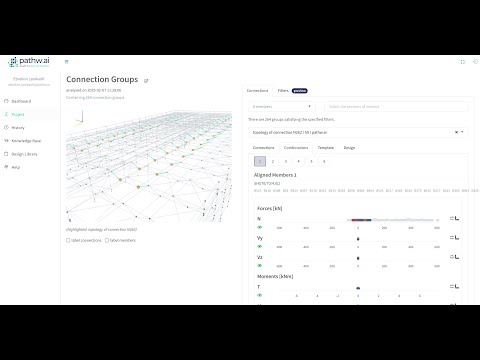
Live Demo: Pathw.ai Integration with Staad.Pro for Structural Steel Detailing Analysis and Design
Join us for an exclusive live demonstration of the Pathw.ai platform, showcasing its seamless integration with Staad.Pro for efficient structural data processing. Discover how engineers can effortlessly export, analyze, and optimize their structural models using cloud-based automation.
What You'll Learn: ✅ Seamless Data Export – Effortlessly transfer structural data from Staad.Pro to Pathw.ai. ✅ Automated Processing – Simplify workflows with intelligent automation for data processing and analysis. ✅ Enhanced Detail Design – Improve accuracy and efficiency with real-time analysis tools. ✅ Collaborative Workflow & Reporting – Leverage cloud-based storage for streamlined teamwork and reporting.
This session is perfect for structural engineers, steel detailing engineers and managers, and steel drafting specialists looking to enhance workflow efficiency and minimize manual effort.
a6467108339449856.cdn.optimizely.com
a6467108339449856.cdn.optimizely.com is blocked
This page has been blocked by an extension
- Try disabling your extensions.
ERR_BLOCKED_BY_CLIENT
Reload
This page has been blocked by an extension